Run your business by just asking.
Type it or just say it. Ask about your business, or add and change orders in plain English — you confirm before anything is saved.
The problem
The answers are in your records, but finding them means clicking through screens or exporting spreadsheets. Entering an order while the phone's still at your ear means typing everything twice.
How it works
- 1
Type it, or tap the mic and say it
On a phone in the van or at the desk, tap the microphone and talk. No forms to find, no menus to learn: say what happened or what you need.
- 2
Ask anything about your records
“Who still owes us?”, “What's due back this week?”, “How many from Beaches Vet this month?”
- 3
Tell it to add or change an order
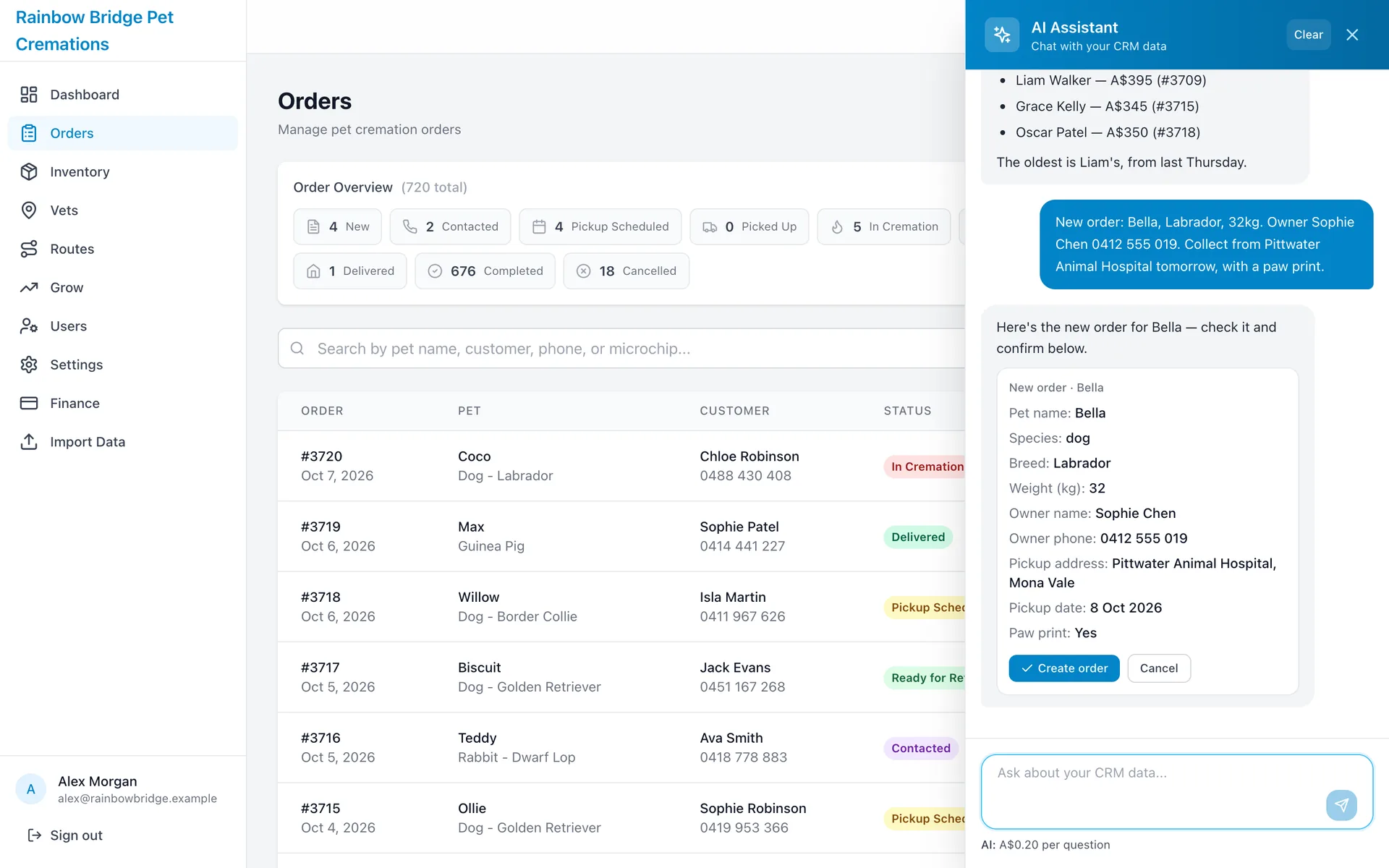
“New order: Bella, Labrador, collect from Pittwater Animal Hospital tomorrow.” It lays out exactly what it will create.
- 4
Nothing changes until you confirm
You see the change and press Confirm. Owners decide whether the assistant can make changes at all, and staff never see business-wide financials.
- 5
Rearrange a route by asking (Pro)
“The family at stop 3 isn't home until 2pm, make it last.” The assistant proposes the new stop order and arrival times update when you accept.
What it means for your business
Answers in seconds instead of digging through screens
Orders entered while you're still on the call, by voice if your hands are full
New staff are useful on day one: they just ask
Safe by design: every change is shown to you first and recorded
Questions: Pro includes 200 a month, then 10c each; Starter 50, then 20c. Each order it adds or changes is charged when you confirm it: 15c typed, 25c spoken, 50c from a photo of a paper form. Rearranging a route by asking is on Pro. See pricing
More of what's inside
Next: Memorial certificates in minutesOrders, call to return
Every pet, every family, every step on one page — and everyone sees where each pet is up to.
ProMemorial certificates in minutes
Photo, pawprint and wording laid out on your own certificate paper. Drag to adjust, print, done.
Starter & ProCollection runs planned for you
The best order to drive today's pickups and returns — and you can change it while the driver is out.
See it with your own orders
30 days free. No credit card. Bring your spreadsheet.